
Remove ISP Branding from Internet Explorer Title Bar

Removing Branded Titles from Internet Explorer
It’s a common frustration: encountering an altered Internet Explorer title bar displaying a company’s name. This often occurs following the installation of software from Internet Service Providers (ISPs) or when purchasing a pre-configured computer system.
The unwanted addition, such as “Some ISP Title” shown in the title bar, can be easily removed from both Internet Explorer 6 and Internet Explorer 7 through a simple registry modification.
Accessing the Registry Key
To begin, open the Windows Registry and navigate to the following key:
HKEY_CURRENT_USER\Software\Microsoft\Internet Explorer\Main
Within this key, locate the string value labeled "Window Title". This value typically contains the intrusive text you wish to eliminate.
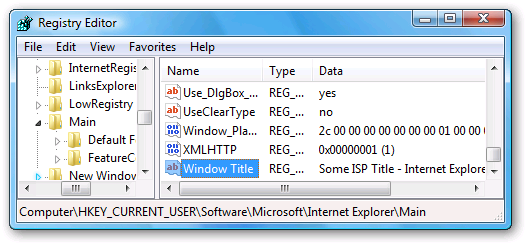
Deleting this string value will restore the default Internet Explorer title bar.
Completing the Removal
Simply press the Delete key to remove the "Window Title" string value. It’s advisable to express your dissatisfaction with the company responsible for this alteration.
After deleting the value, close all instances of Internet Explorer. Upon reopening the browser, the branded title should be gone, and the standard title bar will be restored.